
Pay your 1040 balance due.
A six-step walk-through of IRS Direct Pay. Free, secure, and straight from your bank account.
What you'll need.
- 01Your Social Security Number and date of birth.
- 02A prior-year tax return (the IRS uses it to verify your identity).
- 03The bank routing and account number for the account you want to pay from.
- 04The exact amount you owe (the balance due line on your Form 1040).
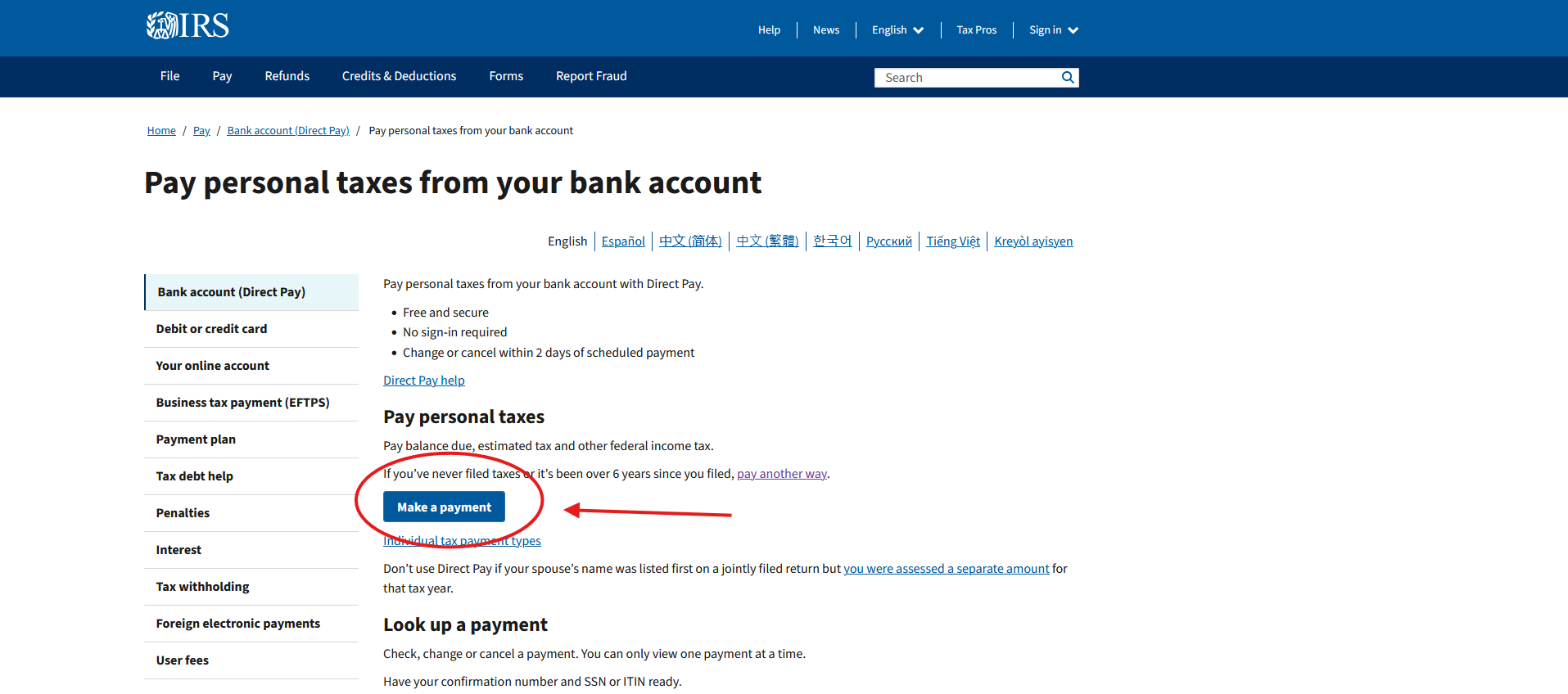
Open IRS Direct Pay.
Go to irs.gov/payments/pay-personal-taxes-from-your-bank-account. This is the official IRS site, and the service is free. There's no account to create and no third-party fees. Click the blue "Make a Payment" button to begin.
Bookmark the URL once you're on it. The IRS has lots of payment pages, and Direct Pay is the one you want for a 1040 balance due.
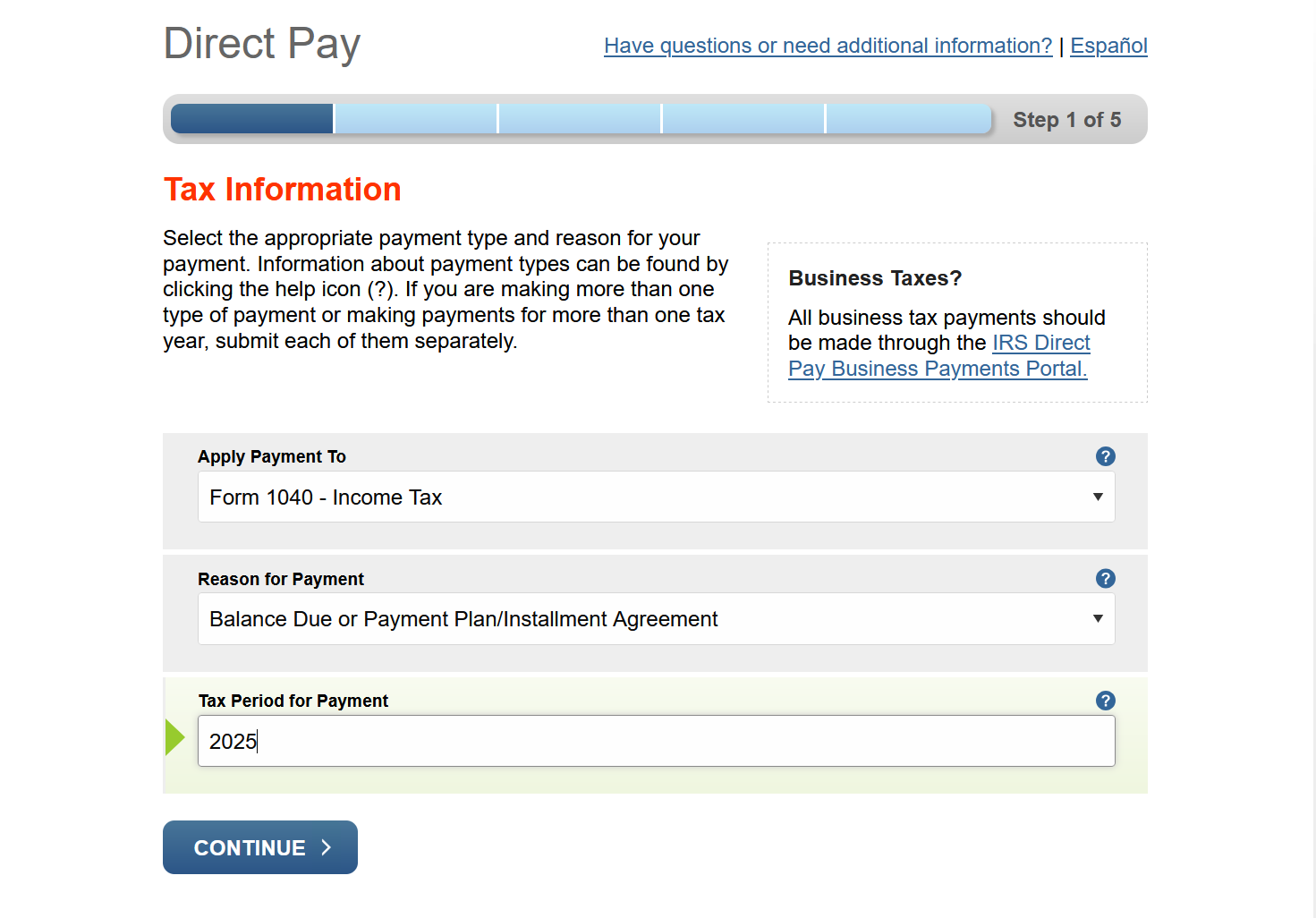
Tell the IRS what you're paying.
On the first screen, you'll fill out three dropdowns. For "Reason for Payment," choose Balance Due. For "Apply Payment To," choose Income Tax - Form 1040. For "Tax Period for Payment," choose the year of the return you're paying for, not the current year.
If you owe for last year's return that you just filed, the tax period is last year. If you're not sure, check the top of your Form 1040.
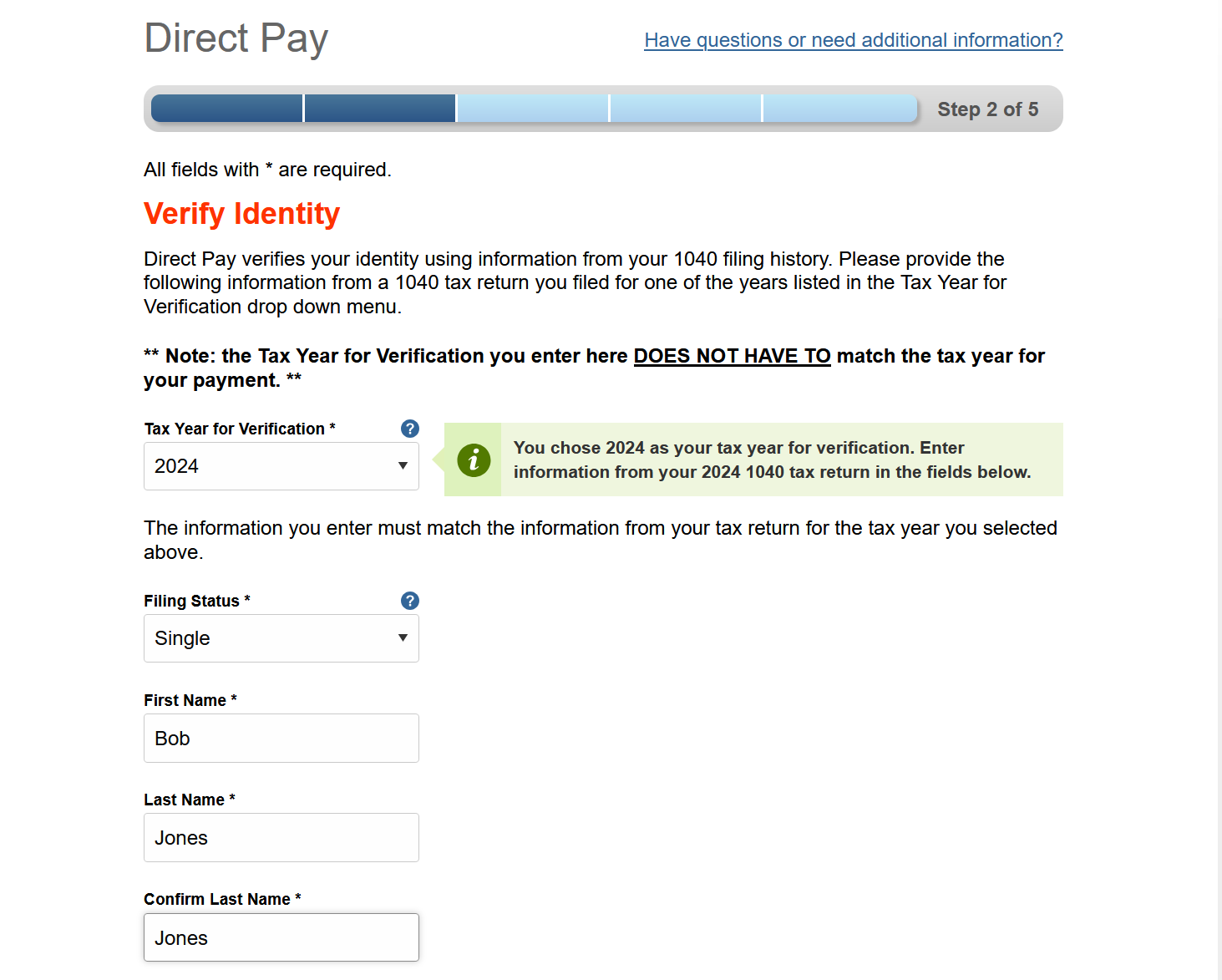
Verify your identity.
The IRS asks for information from a prior-year return to confirm it's really you. You'll enter your filing status, name, Social Security Number, date of birth, and address exactly as it appeared on that return.
Use the verification year shown at the top of the screen, often a year or two back. If your address has changed since then, enter the old one. Direct Pay isn't updating your records, just confirming who you are.
Enter your payment amount and bank info.
Type in the amount you owe, then re-type it in the confirmation box right below. Pick a payment date. It defaults to today, but you can schedule it up to 30 days out. Then enter your bank's 9-digit routing number, choose Checking or Savings, and enter your account number. Direct Pay is for checking and savings accounts only, no credit cards. Double-check the routing and account numbers before continuing, because typos here are the most common cause of failed payments.
On a paper check, the routing number is the first 9 digits in the lower-left, and your account number is the longer string just to the right of it. Many clients schedule the payment for the filing deadline so the cash stays in their account a little longer.
Review and electronically sign.
You'll see a summary of everything you entered: the amount, the scheduled date, the tax type and year, and the last four digits of your bank account. Below that, an electronic signature section asks you to re-enter your name, SSN, and date of birth, and check a box authorizing the IRS to withdraw the funds. Once you submit, the payment is locked in.
If anything looks off, use the back arrow inside Direct Pay rather than your browser's back button. The browser back button can drop your session and you'll have to start over.
Save your confirmation.
After you submit, you'll land on a confirmation page showing a unique confirmation number (a string of letters and numbers), the amount, the scheduled date, and the last four of your bank account. Enter your email address in the field provided so the IRS sends you a copy, and either print the page or save a screenshot for your records.
Keep that confirmation number. You'll need it (along with your SSN) if you ever want to look up, modify, or cancel the payment from the "Look Up a Payment" link on Direct Pay. Cancellations have to happen at least two business days before the scheduled withdrawal.
We'll send you a 1040-V.
If Direct Pay isn't working for you (the verification keeps failing, the bank info won't take, the site is down), or you'd just rather not link a bank account, you can mail a check instead. Form 1040-V is the payment voucher that goes with it, so the IRS knows which return to apply your payment to.
Just send us a quick message and we'll email you a 1040-V pre-filled with your name, SSN, tax year, and the amount due. Print it, write a check to "United States Treasury," and mail both to the address on the voucher. Make sure the check is postmarked by the due date. The IRS goes by postmark, not delivery date.
Request a 1040-VQuick answers.
How long does the payment take to clear?
Direct Pay pulls from your bank account on the date you scheduled, typically the next business day. The IRS treats the payment as received on that scheduled date, so paying on the due date counts as on-time.
What if I owe both federal and Utah state?
Direct Pay is federal only. For Utah, use Utah's Taxpayer Access Point (TAP) at tap.utah.gov. The flow is similar: choose your tax type, enter your bank info, and submit.
Can I pay by credit card instead?
Yes, but the IRS uses third-party processors that charge a fee (around 1.75% to 2%). For most people, paying directly from a bank account is the cheaper choice. If you want the credit card route, see irs.gov/payments and look for "Pay by card or digital wallet."
What if I can't pay the full amount?
Pay what you can now to reduce interest and penalties, then set up a payment plan at irs.gov/payments/online-payment-agreement. If the situation is complicated, call us before you set anything up. Sometimes a short-term plan saves you fees over a long-term one.
Will I get a receipt for my records?
Yes. The confirmation page is your receipt, and the IRS will email a copy if you provide an email address. Keep it with the tax return it's tied to.
We'd rather walk you through it than have you guess.
If anything in Direct Pay isn't matching what's on this guide, or you're not sure which year or amount to enter, send us a message before you submit.
Ask a question